
Self-hosted CRM with an AI assistant: $8.46 a month instead of a per-seat subscription
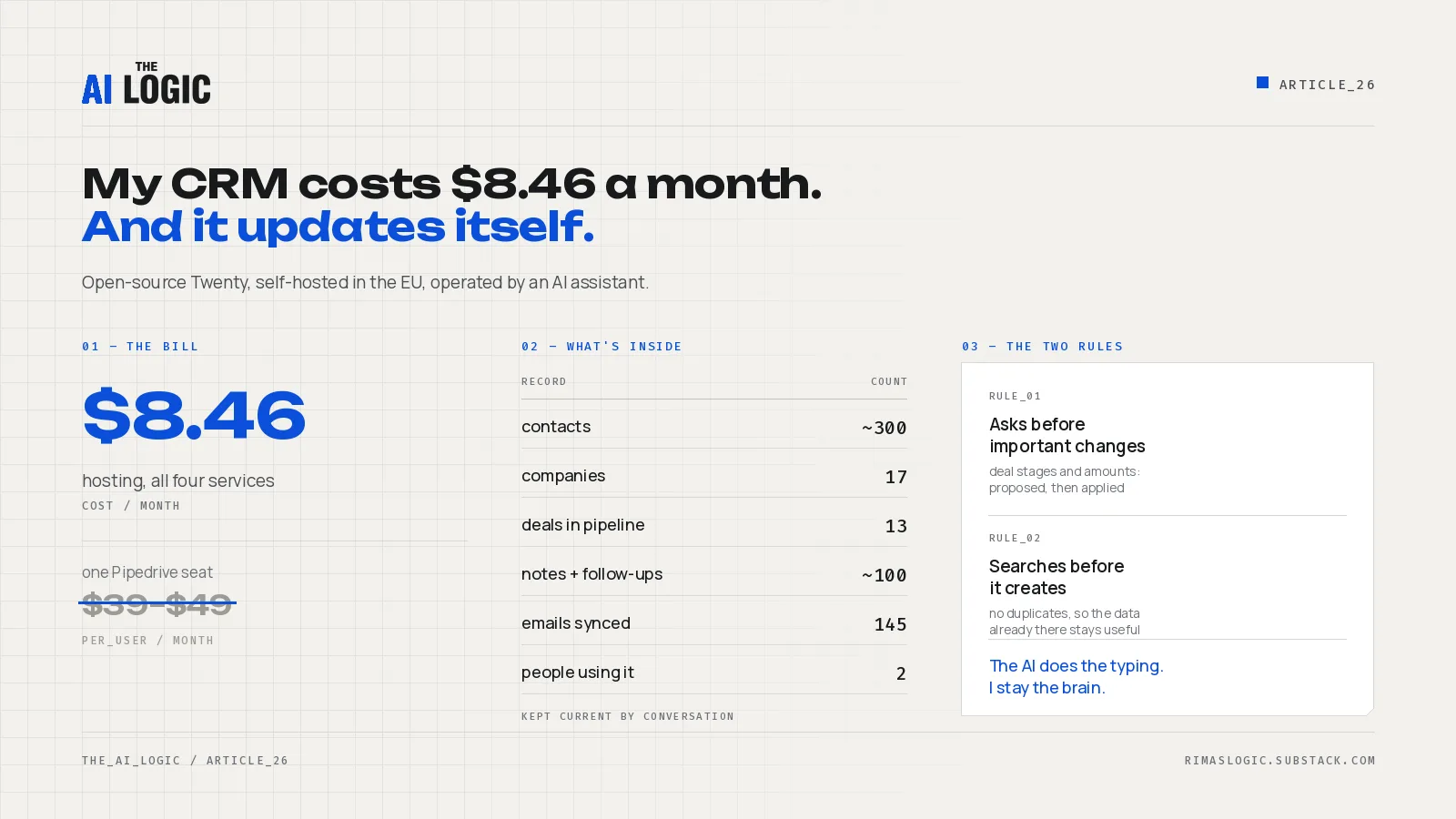
I run my customer database on Twenty, an open-source CRM, self-hosted on my own domain in the EU. Hosting cost me $8.46 in August 2026 for all four services it needs. I do not fill it in by clicking through forms: I paste a conversation or describe a call to an AI assistant, and the contact, the company, the deal, the note and the follow-up land in the right places.
The subscription was never the reason I avoided Pipedrive or HubSpot. The reason CRMs fail is that keeping one current costs a form after every call, so people stop, and a stale CRM helps nobody sell anything. Removing that cost is the part worth copying, whether you self-host or keep paying for the CRM you already have.
Key takeaways
- A CRM goes stale because of the data-entry tax, not the licence fee. Fix the tax first; the tool matters less than you think.
- Twenty self-hosted on Railway cost $8.46 for August 2026 across server, worker, Postgres and Redis. Pipedrive lists Growth at $39 and Premium at $49 per user per month on annual billing.
- Self-hosting is not free in total: the AI assistant that operates the CRM runs on a paid Claude subscription. What you avoid is per-seat pricing, and you gain control of where the data lives.
- Two rules make an AI safe to point at a live pipeline: it searches before it creates anything, and it proposes rather than applies anything consequential.
- You can get most of the benefit without changing CRM. Audit yours against four questions at the end of this article.
Why CRMs go stale
CRMs die inside companies because people are not using them, which means they are not filling in the data. Every entry costs attention right after a call, exactly when the next thing is already starting. The discipline holds for a few weeks and then quietly stops.
Nothing about that is a software problem, which is why switching tools rarely fixes it. The team that would not update CRM A will not update CRM B either. What changes the outcome is making an update cost a sentence instead of a form, and showing people what the collected data is actually for: better targeting, a more personal approach at the next contact, and a pipeline you can read without asking anyone.
What I run instead
Twenty is an open-source CRM, 56k stars on GitHub, built around objects, views and workflows that you can extend, with self-hosting via Docker Compose as a first-class option. I deployed it on Railway to get a stable, managed environment without running my own servers, put it behind my own domain, and kept the data in an EU region.
What is in the workspace as of 1 September 2026:
| Record type | Count |
|---|---|
| People | ~300 (most from a single LinkedIn campaign import) |
| Companies | 17 |
| Deals in the pipeline | 13 |
| Notes and follow-up tasks | ~100 |
| Emails synced from the mailbox | 145 |
| People using it | 2 |
It is no longer a solo tool. A support person has their own login and handles customer email, and the CRM timeline shows that correspondence against the right contacts.
What it actually costs
Here is the August 2026 invoice, service by service, from the Railway project dashboard:
| Service | Cost |
|---|---|
| Twenty (server and web) | $3.85 |
| Twenty Worker | $3.92 |
| Postgres | $0.50 |
| Redis | $0.19 |
| Total | $8.46 |
Against that, Pipedrive’s list pricing puts Growth at $39 and Premium at $49 per user per month on annual billing, checked September 2026. Those are the realistic tiers for a working pipeline, so one seat costs roughly four to six times my entire infrastructure bill, and a second seat doubles it while my bill stays flat.
One honest caveat, because the comparison is often sold dishonestly: the AI assistant that operates this CRM is not free. It runs on a paid Claude subscription I already have for other work. If you count it as a CRM cost, self-hosting stops looking like pocket change. What self-hosting genuinely buys is the absence of per-seat pricing and control over where customer data lives, not a zero bill.
Self-hosting also means you own the operations. When something breaks, nobody is on call but you.
How the AI assistant keeps it current
The CRM exposes an MCP endpoint, so an AI assistant can read and write records through defined tools rather than by driving the interface. I use Claude Code with a purpose-built skill that owns the CRM work.
The loop is four steps:
- Extract. I paste a conversation, a call summary or a rough brain-dump. The assistant pulls out the people, companies, deals, notes and next steps it can identify.
- Resolve. It searches the existing workspace for each of them before creating anything.
- Propose. Anything consequential is shown to me as a change I can approve or reject.
- Apply. Notes and tasks are written directly, and each is linked to every relevant record so it appears on the right timelines.
The input does not have to be tidy, and it does not have to be in English. That matters more than it sounds, because the messy note right after a call is exactly the one that never survives the trip into a form.
The two rules that make it safe
An AI with write access to your pipeline is a genuinely risky idea. Two constraints are what make it work in practice.
It asks before important changes. Adding a note or a follow-up task is additive and reversible, so the assistant just does it. Moving a deal to a new stage, changing an amount, or overwriting a field that already has a value is consequential, so it shows me the change and waits. I do not want mistakes in the pipeline, and I want to stay the one making the decisions. The AI does the typing; the judgement stays with me.
It searches before it creates. Creating records is the easy half and the worthless half. The value of a CRM is in the history already sitting in it: what this client bought last time, what was promised, who introduced whom. An assistant that cheerfully creates a second “Anna K.” every time she is mentioned does not add data, it dilutes what you had. Dedup is not a nicety, it is the thing that keeps the existing data worth querying.
What this setup does not do yet
Email is synced, so mail-based conversations appear on contact timelines. Everything else is still outside: WhatsApp, Discord, Meta Messenger. For a business where a lot of client conversation happens in chat apps, that is a real gap, and it is the next thing I want to close.
This is also a small deployment, honestly described: two users, one pipeline, a single workspace. It is not a case study in scale. It is a case study in removing the data-entry tax.
Should you self-host your CRM?
Self-hosting makes sense when your contact data is a core business asset you want under your control, when per-seat pricing is a real constraint, and when someone can own the operations. It makes much less sense when nobody has time to maintain infrastructure, or when you need mature support and compliance paperwork on day one.
If you want to build something like this, start small. Use a cheap option or an open-source project to play with a CRM first. That is how you find out what you actually need and what you do not, and you can move to a more advanced paid option later with your requirements already understood. Starting with the expensive tool and hoping the requirements appear is the common, costly order.
The four-question CRM audit
You do not need to change tools to get most of the benefit. Take one sitting this week and check the CRM you already have:
- Structure. Do you hold the basics for each customer: first name, last name, email, phone, address?
- Deals. Do you track every potential deal, or only the ones somebody remembered to log?
- Follow-ups. Do you track the next contact for each customer, with a date?
- Commitments. Do you record what was promised to the customer, and separately what the customer said they want?
If the answers are no, the tool is not your problem. The cost of updating it is. Lower that cost, by automation, by an assistant, or by simply making the entry path shorter, and the CRM you are already paying for starts earning its fee.
I build, integrate and maintain automation and AI systems that companies actually use. If you would rather have this done for you than build it yourself, get in touch.
Read next
- n8n disk full: how one Gmail trigger wrote 36 GB of duplicate attachments. Two outages in six days, 36 GB of the same email attachments, and credentials that were never deleted. The diagnosis and the three-step fix.
- An AI inbox assistant that cannot send, delete or hide anything: how it earned each permission. A Gmail assistant on Claude Code routines that started read-only and gains one permission at a time. The trust ladder and the question to ask about any inbox tool.